How We Built Zero-Knowledge Secret Sharing on Cloudflare Workers (Not Secrets Store)
TL;DR
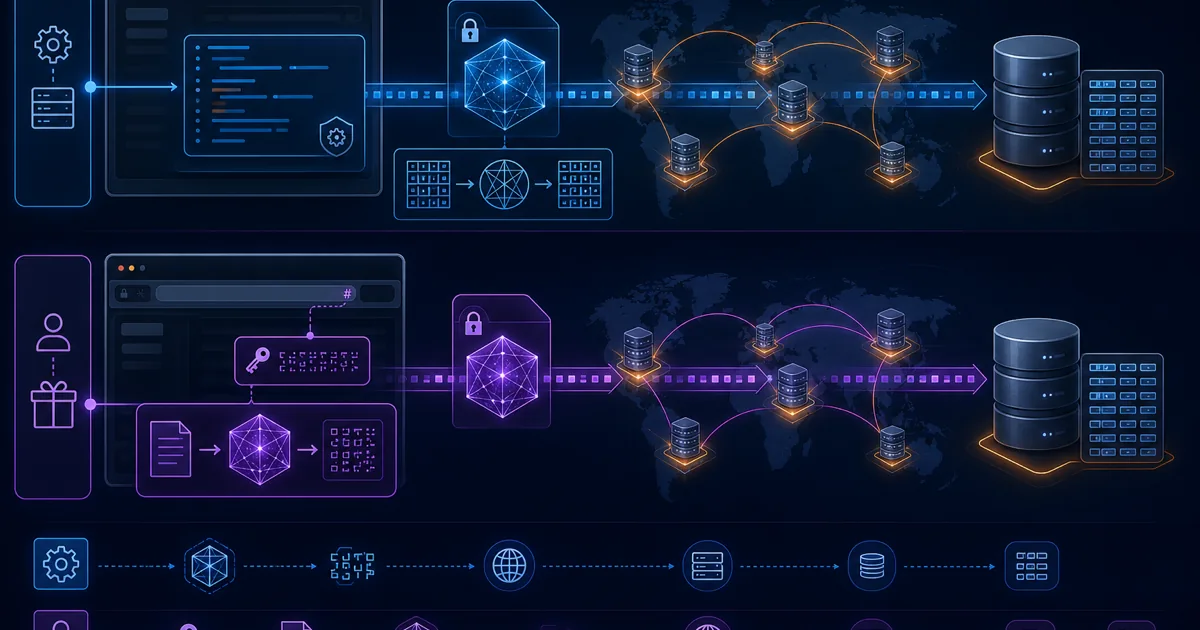
Cloudflare Secrets Store is for storing your Worker's config secrets (API keys, DB passwords) via bindings — not for end users sharing passwords with each other. VanishingVault/SecretDropBox is a zero-knowledge one-time courier: AES-256-GCM in the browser, decryption key in the URL fragment (#), ciphertext in Workers KV, burn-after-read on first view. Different products, different jobs.
We built VanishingVault as a zero-knowledge secret courier on Cloudflare Workers and KV in a five-day sprint: AES-256-GCM in the browser, keys only in the URL fragment, ciphertext with a 7-day TTL, and delete-on-read. This is not Cloudflare Secrets Store — that product holds configuration secrets your Workers bind at runtime. We built a user-facing one-time link tool. This post covers our architecture, what we stored, what we deliberately never saw, and the KV concurrency tradeoff.
Built by Cipher Projects. Related: what is zero-knowledge encryption · best one-time secret sharing tools · VanishingVault vs OneTimeSecret · VanishingVault vs Privnote.
Cloudflare Secrets Store vs a Zero-Knowledge One-Time Link Tool
Search queries like cloudflare secret store or cloudflare secrets store often land on two different problems. Cloudflare's Secrets Store is a platform product: it stores configuration secrets (Worker API tokens, third-party credentials, signing keys) that your code reads through bindings at runtime. It protects your infrastructure's secrets from leaking in source control or wrangler.toml — not from your Worker operator reading them (Cloudflare holds them for delivery to your Worker).
VanishingVault/SecretDropBox solves a different job: users paste a password or API key once, the browser encrypts it client-side, and a recipient opens a burn-after-read link. The Worker is a blind courier — it stores ciphertext in KV and deletes on first read. The decryption key never leaves the URL fragment. That is zero-knowledge secret sharing, not secrets management for your deploy pipeline.
| Dimension | Cloudflare Secrets Store | ZK one-time link tool (this build) |
|---|---|---|
| Primary job | Store config secrets for Workers to bind at runtime | Deliver one-time user secrets between people |
| Who encrypts | Platform-managed delivery to your Worker | Browser (AES-256-GCM via Web Crypto) |
| Storage | Secrets Store namespace (platform product) | Workers KV — ciphertext + TTL only |
| Key custody | Cloudflare delivers to authorized Workers | Key in URL fragment; server never receives it |
| Lifetime | Long-lived until rotated | Burn-after-read or 7-day TTL max |
| Best for | Worker config, deploy secrets, runtime API tokens | Human password/API-key handoffs between parties |
| Honest limits | Not a user-facing share link; not burn-after-read for recipients | Not a secrets manager; KV burn path is not atomic; URL is bearer secret |
You might use both in the same org: Secrets Store for your Worker's Stripe key, and a ZK drop tool when an engineer needs to send a database password to a contractor once.
Stack at a Glance
| Layer | Choice | Why |
|---|---|---|
| Crypto | Web Crypto API · AES-256-GCM | Browser-native, no third-party crypto libs |
| Key transport | URL fragment (#k=...) | Never sent to server (RFC 9110) |
| Edge compute | Cloudflare Workers | Blind store + retrieve/delete API |
| Storage | Cloudflare KV + TTL | Global, auto-expire (7-day max) |
| Frontend | Next.js | Encrypt/decrypt only in the client |
Peer open-source Cloudflare ZK drops often add Durable Objects for the burn path, D1 for metadata, and R2 for larger blobs (see patterns like BurnAfterRead). We kept Workers + KV only — minimum surface that still delivers client-side encryption and delete-on-read.
Threat Model (What ZK Does and Does Not Cover)
| Threat | Protected? | Notes |
|---|---|---|
| Provider or KV dump reads plaintext | Yes | Key never leaves the fragment; server holds ciphertext only |
| TLS / network observer on API calls | Yes (for content) | Sees ID + ciphertext, not the fragment key |
| Stolen share URL (full link with #) | No | URL is a bearer secret — first opener wins |
| Malicious or compromised recipient device | No | After decrypt, plaintext is on their machine |
| Two concurrent opens of a one-view secret | Best-effort on KV | Non-atomic get→delete; Durable Objects harden this |
| Chat/email link unfurl bots | No (if GET burns) | Preview fetch can consume one-view; fix with Reveal click |
Hardening peers often add: strict CSP, rate limits on create/read, revoke tokens, and “paranoid” responses that always return not-found (no timing oracle for burned vs missing). Those are worthwhile if you fork the pattern; they are orthogonal to the fragment-key idea.
What We Would Change in 2026
The fragment-key + Web Crypto model still matches how open-source Cloudflare ZK drops are built. The production gaps we would close next (and that peers already document):
- Durable Objects on the burn path — serialize get→delete per secret ID so two parallel readers cannot both receive ciphertext. Cloudflare’s DO input gates exist for exactly this class of race.
- Explicit Reveal click — landing page loads metadata only; ciphertext fetch + delete runs after a human click so Slack/Teams unfurls do not burn the link.
- Security headers — CSP that blocks unexpected scripts,
Referrer-Policy: no-referrer,X-Frame-Options: DENYso IDs and accidental fragment leakage via referrers are harder. - Optional R2 for larger blobs — keep small password handoffs in KV/DO storage; put bigger encrypted files in R2 with the same fragment key.
None of that changes the product job: a blind courier for one-time secrets. See also why zero-knowledge architecture should be the default.
Technical Implementation
The design constraint was simple: the provider must never be able to read a secret, even with full infrastructure access. That rules out server-side encryption with provider-held keys. Encryption happens exclusively in the browser; the Worker is a courier for opaque blobs.
Architecture Overview
Two tiers, not three. The Next.js frontend owns all crypto via the Web Crypto API. Sensitive data becomes ciphertext before it leaves the device. The Cloudflare Worker receives encrypted blobs and stores them in KV without any ability to decrypt. If the entire backend were compromised, attackers would find ciphertext and IVs — not keys.
What Never Touches the Server
- Plaintext secrets
- AES encryption keys (URL fragment only)
- User accounts or identity for anonymous shares
What does touch the server: ciphertext, IV, a random ID, and a TTL. That is the entire trust boundary.
Backend Implementation with Cloudflare Workers
Core store and retrieve (burn-after-read) handlers:
// Store endpoint - saves an encrypted secret
async function handleStore(request) {
  const { encryptedData, expiresAt } = await request.json();

  // Generate a random ID for the secret
  const id = crypto.randomUUID();

  // Store the encrypted data in KV with TTL
  await SECRETS_STORE.put(
    id,
    JSON.stringify({ encryptedData }),
    { expirationTtl: 604800 } // 7 days in seconds
  );

  return new Response(
    JSON.stringify({ id }),
    { headers: { 'Content-Type': 'application/json' } }
  );
}

// Retrieve endpoint - gets and deletes a secret (one-time access)
async function handleRetrieve(request, id) {
  // Get the secret from KV
  const secretData = await SECRETS_STORE.get(id);

  if (!secretData) {
    return new Response(
      JSON.stringify({ error: 'Secret not found or already viewed' }),
      { status: 404, headers: { 'Content-Type': 'application/json' } }
    );
  }

  // Delete the secret immediately (one-time access)
  await SECRETS_STORE.delete(id);

  return new Response(
    secretData,
    { headers: { 'Content-Type': 'application/json' } }
  );
}
Honest limitation: KV is not atomic
The get-then-delete pattern above is the standard Workers KV burn-after-read approach, but two concurrent requests can both read before either delete completes. Durable Objects serialize work per object (Cloudflare’s input gates and storage semantics), which is why several Cloudflare-based ZK drop projects put the burn path on a DO. We accepted the KV tradeoff for simplicity and latency; most password handoffs are not contested under parallel readers.
Frontend Encryption with Web Crypto API
On the frontend, we use the Web Crypto API (secure contexts only: HTTPS or localhost) to handle encryption and decryption — no third-party crypto libraries:
// Generate a random encryption key
async function generateEncryptionKey() {
  return window.crypto.subtle.generateKey(
    { name: "AES-GCM", length: 256 },
    true,
    ["encrypt", "decrypt"]
  );
}

// Encrypt data with the generated key
async function encryptData(key, data) {
  // Create a random initialization vector
  const iv = window.crypto.getRandomValues(new Uint8Array(12));

  // Encode the data as UTF-8
  const encodedData = new TextEncoder().encode(data);

  // Encrypt the data
  const encryptedBuffer = await window.crypto.subtle.encrypt(
    { name: "AES-GCM", iv },
    key,
    encodedData
  );

  // Convert the encrypted data and IV to base64
  const encryptedData = bufferToBase64(encryptedBuffer);
  const ivBase64 = bufferToBase64(iv);

  return { encryptedData, iv: ivBase64 };
}

// Decrypt data with the provided key
async function decryptData(key, encryptedData, iv) {
  // Convert base64 back to ArrayBuffer
  const encryptedBuffer = base64ToBuffer(encryptedData);
  const ivBuffer = base64ToBuffer(iv);

  // Decrypt the data
  const decryptedBuffer = await window.crypto.subtle.decrypt(
    { name: "AES-GCM", iv: ivBuffer },
    key,
    encryptedBuffer
  );

  // Decode the decrypted data as UTF-8
  return new TextDecoder().decode(decryptedBuffer);
}
Secret URL Generation
When a user creates a secret, we:
- Generate a random encryption key
- Encrypt the secret with this key
- Send the encrypted data to the server
- Receive a unique ID from the server
- Create a URL with the ID and the encryption key as a fragment
The encryption key is never sent to the server. Instead, it's added as a URL fragment (the part after the # symbol). Browsers do not include fragments in HTTP requests, so Workers and KV never receive the key — even in access logs.
// Create a secret URL
async function createSecretUrl(secret) {
  // Generate a random encryption key
  const key = await generateEncryptionKey();

  // Export the key to raw format
  const rawKey = await window.crypto.subtle.exportKey("raw", key);

  // Convert the key to base64
  const keyBase64 = bufferToBase64(rawKey);

  // Encrypt the secret
  const { encryptedData, iv } = await encryptData(key, secret);

  // Send the encrypted data to the server
  const response = await fetch('/api/store', {
    method: 'POST',
    headers: { 'Content-Type': 'application/json' },
    body: JSON.stringify({ encryptedData, iv })
  });

  const { id } = await response.json();

  // Create the secret URL with the key as a fragment
  return `${window.location.origin}/s/${id}#k=${keyBase64}`;
}
Privacy Benefits of Our Approach
Complete Privacy
Our zero-knowledge architecture ensures that even we cannot access your personal data.
Quick Implementation
The Cloudflare stack allowed us to deploy a privacy-focused solution in just 5 days.
No Data Retention
Secrets automatically vanish after being viewed, leaving no digital trail.
Deployment Process
Deploying our solution to production was straightforward thanks to Cloudflare's developer-friendly tools:
1. Setting Up the KV Namespace
# Create a KV namespace for secrets
wrangler kv:namespace create "SECRETS_STORE"

# Add the namespace to wrangler.toml
# kv_namespaces = [
#   { binding = "SECRETS_STORE", id = "your-namespace-id" }
# ]
2. Configuring CORS for Multiple Domains
Since we operate on two domains (vanishingvault.com and secretdropbox.com), we needed to configure CORS properly:
// CORS headers function
function corsHeaders(request) {
  // Get the origin from the request
  const origin = request.headers.get('Origin');
  const allowedOrigins = [
    'https://secretdropbox.com',
    'https://vanishingvault.com',
    'http://localhost:3000' // For development
  ];

  // Check if the origin is allowed
  const allowedOrigin = allowedOrigins.includes(origin)
    ? origin
    : allowedOrigins[0];

  return {
    'Access-Control-Allow-Origin': allowedOrigin,
    'Access-Control-Allow-Methods': 'GET, POST, DELETE, OPTIONS',
    'Access-Control-Allow-Headers': 'Content-Type',
    'Access-Control-Max-Age': '86400',
  };
}
3. Deploying the Worker
# Deploy the worker
wrangler deploy

# Configure custom domain routes
# In your Cloudflare dashboard:
# - Add a route pattern: secretdropbox.com/api/*
# - Add a route pattern: vanishingvault.com/api/*
Real-World Use Cases
Our zero-knowledge secret sharing tool is designed to address a variety of secure sharing needs:
- Share sensitive personal information with family members
- Securely transmit passwords to friends
- Send private account details to trusted contacts
- Share temporary access codes without leaving a trace
Frequently Asked Questions
Is Cloudflare Secrets Store the same as this zero-knowledge tool?
No — different jobs. Cloudflare Secrets Store is a platform product for storing configuration secrets (API tokens, database passwords) that your Workers read at runtime via bindings. VanishingVault/SecretDropBox is a user-facing one-time secret courier: the browser encrypts with AES-256-GCM, Workers + KV store ciphertext for burn-after-read delivery, and the decryption key lives in the URL fragment. Secrets Store protects your Worker's secrets; a ZK drop tool protects secrets your users share with each other.
How does zero-knowledge secret sharing work on Cloudflare?
The browser encrypts the secret with AES-256-GCM via the Web Crypto API before upload. Cloudflare Workers store only ciphertext in KV. The decryption key lives in the URL fragment after # and is never sent in HTTP requests, so Workers, KV, and logs never see it.
Why put the encryption key in the URL fragment?
URL fragments (#...) are client-side only. Per HTTP (RFC 9110), browsers do not include the fragment in requests to the server. The Worker therefore receives an opaque ID and ciphertext without the key — a database dump cannot decrypt secrets.
If someone steals the share URL, can they read the secret?
Yes. The fragment key travels with the link, so the URL is a bearer secret — whoever opens it first decrypts. Zero-knowledge protects against the provider and a stolen database; it does not protect against a leaked link. Confirm recipients out of band, avoid public channels, and rotate credentials if the wrong party may have viewed the link.
Does Web Crypto work offline or on plain HTTP?
The Web Crypto API is available in secure contexts only (HTTPS or localhost). Production secret-sharing UIs must be served over TLS. That is a browser platform rule, not a Cloudflare-specific limit.
Why Cloudflare Workers and KV for secret sharing?
Workers run at the edge with no long-lived app servers to patch. KV provides global, TTL-backed storage so ciphertext expires automatically (we use a 7-day max). That combination ships a zero-knowledge courier without managing VMs.
Is Cloudflare KV atomic for burn-after-read?
No. A get-then-delete on Workers KV is not a single atomic transaction. Two simultaneous reads of a one-view secret could theoretically both succeed. Durable Objects serialize access per object (input gates / storage semantics), which is why several open-source Cloudflare ZK drop tools use a DO for the burn path. We accepted the KV tradeoff for simplicity; most password handoffs are not contested under parallel readers.
What does the server actually store?
Only ciphertext, an IV, an ID, and a TTL. No plaintext, no encryption keys, no user accounts, and no view-identity logs. After the first successful retrieve — or after TTL — the KV entry is deleted.
Can chat link previews burn a Cloudflare one-time secret?
Yes if the first GET to the retrieve API counts as a view. Slack, Teams, and mail clients often fetch URLs for unfurls. Hardening pattern used by peers: serve a landing page that does not delete until the human clicks Reveal, then call burn-after-read. That also pairs well with Durable Objects for atomic delete.
Would you still pick Workers KV today?
For a five-day MVP, yes — TTL and global read are enough. For production hardening in 2026 we would put the burn path on a Durable Object (serialized access), keep optional large blobs in R2, and add CSP + Referrer-Policy: no-referrer so fragments and IDs leak less via referrers. The fragment-key / Web Crypto model stays the same.
Conclusion
VanishingVault gives privacy-conscious individuals a secure way to share sensitive information. By leveraging Cloudflare's edge infrastructure and client-side encryption, secrets stay under user control while delivery stays global and simple.
Compare the wider landscape in best one-time secret sharing tools.